A big one. AI reports, WhatsApp, automatic currency conversion and a faster Apple Pay setup, all wrapped in a design updated for iOS 27.
- AI Reports. Ask about your spending in plain language and get a full report with the numbers behind it
- MonAi on WhatsApp. Message the MonAi bot on WhatsApp, by text or voice note, and it lands in your list as a transaction
- Automatic currency conversion. Pay in a foreign currency and MonAi converts it to yours on the spot
- Easier Apple Pay setup. Setting up the Apple Pay automation just got easier — if you already use it, set up the latest version of the shortcut
- Design updated for iOS 27
- Recurring transactions are now included in CSV exports and imports
- Performance improvements throughout the app
Home, your way. This one's been a long time coming — I wanted to get it just right, so I took my time with it, and I think it turned out great. Choose how your spending is organized: weekly, biweekly, semimonthly (great for "quincena" pay schedules), monthly, or all time — and peek at a different view any time without losing your default.
- Flexible periods. Set Home's default view to match how you actually get paid: weekly, biweekly, semimonthly with custom start days, monthly with a custom start day, or all time
- Quick period overrides. Tap the calendar button to peek at a Month, Year, All Time, or Custom Range — without changing your saved default
- Redesigned period picker. Swipe through past and upcoming periods right on Home, each showing its own spending total
- Cleaner custom date range picker with clearer wording and a live range summary
- Smarter compact number formatting — amounts like "$1.6K" now show the right precision for your currency, and always match between the app and widgets
- Redesigned income/expense switch with a fluid new look
- Various bug fixes and animation polish throughout Home
Revamped Apple Pay. Setting up Apple Pay tracking is now a guided experience with step-by-step instructions and video tutorials. The new shortcut is also more reliable with built-in fallback handling.
- More reliable Apple Pay tracking. The new shortcut runs in the background with fallback persistence, so transactions are captured even when things don't go perfectly
- Pending transactions. See transactions that are still processing right on the home screen, with options to retry or edit them
- Instant tracking. Voice transactions are now saved automatically without manual confirmation — you can opt out from the home screen or in Settings
- Clearer error messages when Apple Pay transactions fail
- Your last used email is now remembered for faster sign-in
- Home screen performance improvements and UI cleanup
- Improved AI category learning and various bug fixes
Budgets are here! Set spending limits for any category and stay on track. See at a glance how much you've spent versus your limit, right on the main screen, when selecting categories, and now even from your Home Screen with new budget widgets.
Set them up in Settings → Budget, or long press any category bar and swipe up to add or edit a budget directly.
- Category budgets. Set monthly limits for any category and see your progress as a visual bar
- Long press category bars. Quickly add a new transaction, set a budget, or see remaining budget for any category
- Budget widgets. New configurable Home Screen widgets show your budget overview or list of categories at a glance
- Remaining budget on entry. When selecting a category, instantly see how much is left in that budget
- Smarter AI. The AI assistant now knows your budgets and suggests appropriate categories
- Shared list widgets stay updated automatically in the background
- CSV exports now include the transaction creator
- Various UI improvements and bug fixes
Performance enhancements.
All new design with Liquid Glass! I try to stay up to date as much as possible so you always benefit from the latest and greatest changes. The beauty of Liquid Glass inspired me to redesign the home screen as well as the list of transactions.
All new design with Liquid Glass! I try to stay up to date as much as possible so you always benefit from the latest and greatest changes. The beauty of Liquid Glass inspired me to redesign the home screen as well as the list of transactions.
Addressed an issue where the subscription screen occasionally remained open even after a successful purchase.
Bugfixes and improvements.
Currency Converter is here. Turn it on to convert any amount from the chosen currency into your base currency. Say you're on vacation in the U.S. but still want to track your expenses in your main currency, just set the conversion currency to USD and it will automatically convert any amount to your base currency regardless if you're using the Apple Pay automation or tracking it manually.
Also fixes an issue where the amount on the transaction entry screen wasn't formatted correctly if you had income disabled.
Improve Apple Pay Automation.
Fixes an issue with the "Transaction with Prompt" Apple-Shortcut.
New and improved Apple Pay shortcut which should be more robust and prevent problems with the amount. It also lets you pre-select tags and the list in which the transaction should be saved.
Dark Mode. MonAi now supports dark mode, adapting to your system preferences for a more comfortable experience at night.
Spanish Localization. Hola! MonAi is now available in Spanish.
Voice Input Improvements. Voice input is now more flexible:
- Tap and hold or use single tap to start/stop recording
- Cancel voice input if needed
- Improved permission handling
New Features & Improvements:
- New quarterly recurrence option for recurring transactions
- Enhanced currency and amount display
- Various performance improvements under the hood
Split expenses. Shared lists now save the creator of the expense so you can see who spent how much and then split the total evenly among all participants. You can even group participants which is great for couples.
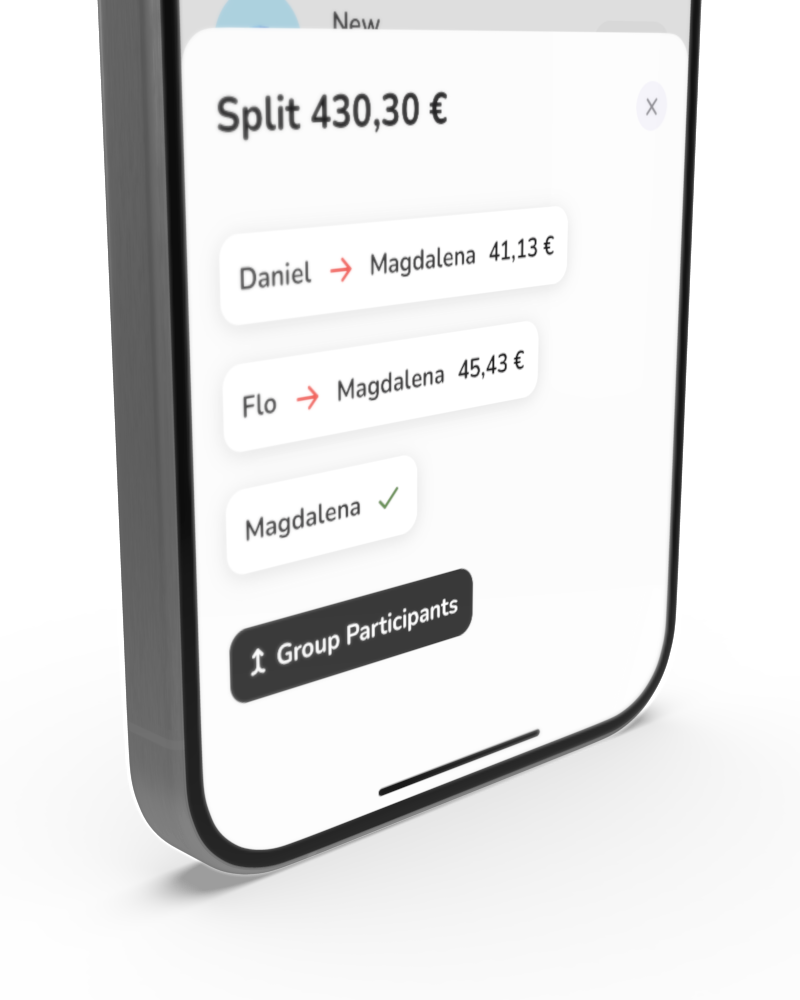
The creator of the expenses do not work for older transactions, you can change the creator on the transaction edit screen.
Shortcut / Apple Pay improvements. The shortcut - which is also used for the Apple Pay automation - now lets you manually choose a category in case it couldn't be automatically detected.
Recurrence issue. There was an issue where recurring transactions were sometimes not triggered. This is fixed now and not triggered transactions were back tracked with this version automatically. You might want to double check in case you added them manually as a temporary fix.
List of recurring transactions. In the settings you can now view and remove all of your recurring transactions.
Swipe to change month. On the main screen of the app, you can now swipe left and right on the amount label to quickly jump to the next or previous month. (Pro users only)
Rollover. If you decided to show your income you can now enable rollover in the settings, which lets you see your total balance (income - expenses) of all transactions rather than only this month.
New category from transaction entry. You can now add a new category right from the transaction entry screen. Just tap the + icon next to the categories.
Home Screen Widget. I heard you, loud and clear. It was time for a widget. Here it is. It's a start, there's more to come further down the road.
Recurring transactions. The most requested feature is now a reality. You can now easily add recurring transactions, or add a specific date, right from your already familiar entry screen.
Just open the entry screen and select from the dropdowns above your description field.
The speech to text recognition currently works for setting a date but not yet to set recurring entries.
Just say something like "Spent 50 dollar at Walmart yesterday".
Currency selector. You are now able to change your currency separate from your app region.
In the MonAi app, go to Settings and scroll down to "Currency".
There is currently only one base currency, so entering multiple different currencies is not possible as of now.
Siri support*. Add your expenses automatically without even opening the app.
*Unfortunately it does come with a small asterisks:
- Available for iOS 16+
- Supported languages are English and German
- Due to a limitation it needs to be a 2 step process, activated by: "New expense (in MonAi)", followed by a question from Siri to enter an amount and a description
The implementation uses AppIntents, so this will also be available in your shortcuts app for you to build your own awesome workflows.
Any issues? Don't hesitate to contact me at monai@florianvates.com